
Photography
AI jewelry photography: studio-grade images without a studio
Catalog-ready 4K photography rendered in about 30 seconds.
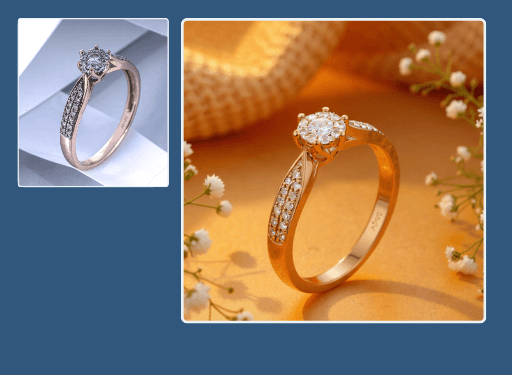
AI jewelry photography turns an ordinary phone or product shot into a showroom-ready 4K image, no lightbox or photographer required. Upload a piece, choose a look, and Hues renders clean, evenly lit catalog frames in roughly 25 to 30 seconds. Every image ships at full resolution with complete commercial rights.
Why jewelers use it
Trained on the trade
Our models learn from more than 100 jewelry datasets, so prongs, pavé, and metal finishes read true rather than plastic.
Studio quality, no studio
Replace expensive shoots with consistent lighting and framing that hold across an entire collection.
Fast enough for full catalogs
Renders land in about 25 to 30 seconds, and batch processing lets you push a season of styles through at once.
Yours to sell
Output arrives in 4K with full commercial rights, ready for your site, marketplace, or lookbook.
How it works
- 1
Upload your piece
Drop in a product photo, flat lay, or CAD file of any ring, necklace, or watch.
- 2
Choose the look
Pick a surface, lighting mood, and framing that match your brand's visual language.
- 3
Render in seconds
Hues generates a clean 4K image in about 30 seconds, ready to download.
What you can feed it
- Product photos
- Phone snapshots
- Flat lays
- CAD files
- Hand sketches
Frequently asked questions
No. Hues replaces the lightbox, backdrop, and lighting rig entirely. You upload an existing shot or file and the studio renders the finished image, so you skip set-up, styling, and post-production time.
Most images render in about 25 to 30 seconds. Because the studio also supports batch processing, you can queue an entire collection and collect the finished frames together rather than shooting piece by piece.
Yes. Every output carries full commercial rights, so you own the result outright. Use it on your e-commerce store, marketplace listings, printed catalogs, or paid campaigns without any extra licensing.
New accounts receive 80 free credits once you verify your email address, with no card required. Every tool shows its exact credit cost before you run it, and credits are a one-time purchase rather than a subscription, so you can try the platform and see the price up front.
Related tools & reading
Jewelry photo retouching
Dust, glare, and fingerprints gone in about 30 seconds.
Jewelry background removal
Clean or styled backgrounds rendered in about 30 seconds.
Jewelry product video
A rotating 4K product clip in one to two minutes.
CAD Rendering
CAD rendering is the process of converting a three-dimensional computer-aided design file into a photorealistic still image or animation, letting a product be seen and evaluated before it is ever manufactured.
Product Retouching
Product retouching is the post-production editing of a product photograph to remove imperfections, correct color and exposure, and present the item cleanly and accurately for sale.
How to Photograph Jewelry at Home Like a Pro
A hands-on guide to photographing jewelry: the gear that matters, how to control light and reflections, the camera settings for crisp detail, and where to stop fussing and let software help.
AI jewelry photography tools compared
Hues AI against Photoroom, Pebblely, Midjourney and a studio shoot.
Start with 80 free credits
No card required. Turn your next product shot into catalog-ready imagery in under a minute.