
Virtual Try-On
Jewelry set virtual try-on: a full matching suite on one model
Coordinated set imagery rendered in about 30 seconds.
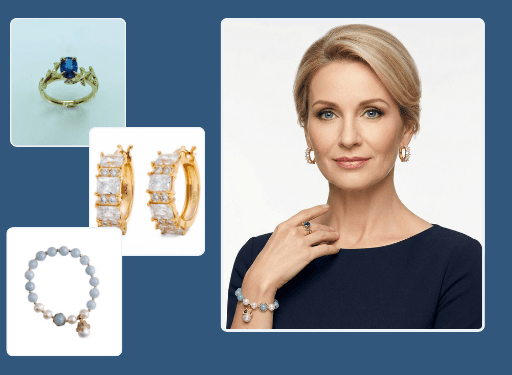
This jewelry set try-on tool styles a full matching suite, necklace, earrings, ring, and bracelet, on a single lifelike model at once. Upload the pieces and Hues renders a coordinated on-model image in about 30 seconds, so shoppers see the complete look. Output is 4K with full commercial rights.
Why jewelers use it
The whole look, together
Show a bridal or gifting suite as a styled ensemble, the way it is actually worn and sold.
Bigger baskets
Presenting pieces as a set encourages shoppers to buy the coordinated suite rather than one item.
No full styling day
Assemble a complete on-model look without a model, stylist, or studio booking.
Sell-ready files
Coordinated renders arrive in 4K with full commercial rights for storefront and campaigns.
How it works
- 1
Upload the pieces
Add each item in the suite, from earrings to bracelet.
- 2
Style the set
Hues places every piece on one model with consistent light and pose.
- 3
Download the look
Collect a coordinated 4K image in about 30 seconds.
What you can feed it
- Necklace photos
- Earring shots
- Ring images
- Bracelet flat lays
- CAD files
Frequently asked questions
Yes. You can place a matching necklace, earrings, ring, and bracelet on the same model in a single styled image. This is ideal for bridal and gifting collections that are designed and merchandised as a set.
Presenting pieces as a coordinated look encourages shoppers to picture and buy the whole suite rather than a single item. It is a merchandising advantage that individual product shots rarely achieve.
No. Hues assembles the on-model look from your product images, so there is no stylist, model, or studio day involved. You get consistent styling across every set on demand.
New accounts get 80 free credits once you verify your email address, with no card required. A full set render shows its exact credit cost before you run it. Credits are a one-time purchase — there is no plan to choose and no subscription.
Related tools & reading
Virtual necklace try-on
Lifelike on-model necklace imagery in about 30 seconds.
Earring virtual try-on
On-ear studs, hoops, and drops rendered in about 30 seconds.
Virtual ring try-on
Lifelike on-hand ring imagery rendered in about 30 seconds.
Virtual Try-On for Jewelry E-Commerce: A Complete Guide
How virtual try-on works for jewelry, why it helps shoppers commit, the categories it suits best, and a practical path to adding it to your store without a heavy build.
AI jewelry photography tools compared
Hues AI against Photoroom, Pebblely, Midjourney and a studio shoot.
Start with 80 free credits
No card required. Turn your next product shot into catalog-ready imagery in under a minute.