
Virtual Try-On
Virtual ring try-on: see any ring on the hand before it ships
Lifelike on-hand ring imagery rendered in about 30 seconds.
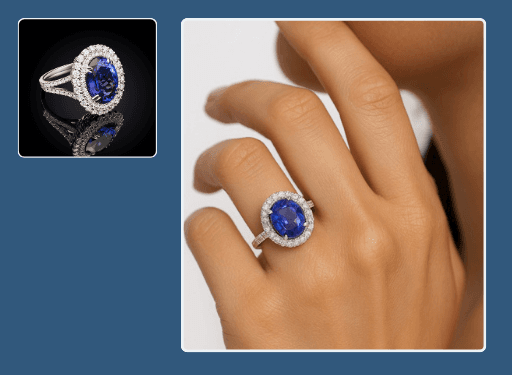
Virtual ring try-on places any ring on a natural, well-lit hand without booking a hand model. Upload the piece and Hues renders a believable on-finger image in about 30 seconds, so shoppers see scale, fit, and finish before they buy. Output is 4K with full commercial rights.
Why jewelers use it
Scale shoppers trust
An on-hand view answers the question flat lays cannot: how the band and stone actually sit on a finger.
No hand model booking
Skip the casting, manicure, and studio time and generate on-finger imagery on demand.
Consistent across the range
Present solitaires, bands, and statement rings on the same lighting and pose for a tidy collection page.
Commerce-ready output
Each render lands in 4K with full commercial rights for product pages and ads.
How it works
- 1
Upload the ring
Add a product photo or CAD file of the ring you want to show.
- 2
Place it on-hand
Hues fits the ring to a lifelike finger with natural lighting and shadow.
- 3
Download the try-on
Collect a 4K on-hand image in about 30 seconds.
What you can feed it
- Ring product photos
- CAD files
- Loose setting renders
- Solitaire shots
- Band close-ups
Frequently asked questions
Yes. Hues renders the band width and stone size in believable proportion to the hand, so the try-on reflects how the ring truly sits. This helps reduce returns caused by shoppers misjudging scale from a flat product photo.
You can generate on-hand imagery that suits your brand's look and audience. The point is to give shoppers a relatable sense of fit and finish without booking a hand model or studio for every new style.
No. A product photo or a CAD file is enough, which means you can render try-on imagery for pieces still in production or made to order before a sample exists.
New accounts get 80 free credits once you verify your email address, with no card required. The exact credit cost of each try-on render is shown before you run it, and credits are a one-time purchase — there is no subscription and no monthly minimum.
Related tools & reading
Virtual necklace try-on
Lifelike on-model necklace imagery in about 30 seconds.
Virtual bracelet try-on
On-wrist bangles and chains rendered in about 30 seconds.
Jewelry set try-on
Coordinated set imagery rendered in about 30 seconds.
Virtual Try-On
Virtual try-on is a digital imaging technology that lets a shopper see how a piece of jewelry, apparel, or an accessory looks on a real person or model before it is physically produced or purchased.
Virtual Try-On for Jewelry E-Commerce: A Complete Guide
How virtual try-on works for jewelry, why it helps shoppers commit, the categories it suits best, and a practical path to adding it to your store without a heavy build.
AI jewelry photography tools compared
Hues AI against Photoroom, Pebblely, Midjourney and a studio shoot.
Start with 80 free credits
No card required. Turn your next product shot into catalog-ready imagery in under a minute.