
Virtual Try-On
Virtual watch try-on: a timepiece on the wrist instantly
On-wrist watch imagery rendered in about 30 seconds.
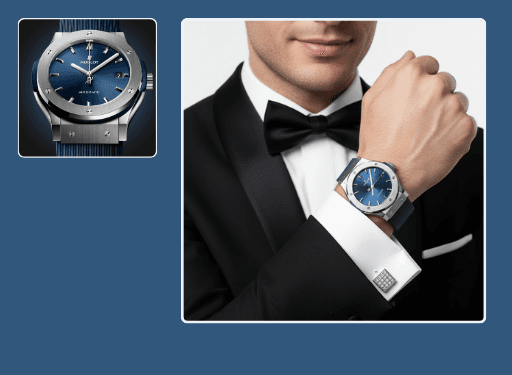
This watch try-on tool places any timepiece on a lifelike wrist so shoppers can judge case size, band, and proportion. Upload the watch and Hues renders a believable on-wrist image in about 30 seconds, with dial and metal intact. Output is 4K with full commercial rights.
Why jewelers use it
Case size in context
A 40mm and a 44mm case finally look different, because shoppers see them against a real wrist.
No studio time
Skip the wrist model and lighting rig and render on-wrist imagery on demand.
Detail held true
Trained on jewelry, the model keeps dial markings, bezels, and polished links honest.
Retail-ready output
Every render is 4K with full commercial rights for listings and marketing.
How it works
- 1
Upload the watch
Add a product photo or CAD render of the timepiece.
- 2
Place it on-wrist
Hues fits the watch to a lifelike wrist with accurate lighting.
- 3
Download the shot
Collect a 4K on-wrist image in about 30 seconds.
What you can feed it
- Watch product shots
- Dial close-ups
- Bracelet-band photos
- CAD renders
- Catalog images
Frequently asked questions
Yes. Hues renders the case and band in believable proportion to the wrist, so a shopper can tell how a larger diameter will actually wear. This context is exactly what a flat product image cannot deliver.
It will. Because the model is trained on jewelry and watches, indices, hands, and bezel engraving stay crisp rather than softening. Polished links keep their shine without blowing out.
No. A product photo or CAD render is enough, so you can create on-wrist imagery for new references before samples arrive at retail.
You begin with 80 free credits once you verify your email address, and no card is needed. The exact credit cost of each render is shown before you run it, and credits are bought once rather than billed monthly.
Related tools & reading
Virtual bracelet try-on
On-wrist bangles and chains rendered in about 30 seconds.
Virtual ring try-on
Lifelike on-hand ring imagery rendered in about 30 seconds.
AI jewelry photography
Catalog-ready 4K photography rendered in about 30 seconds.
AI jewelry photography tools compared
Hues AI against Photoroom, Pebblely, Midjourney and a studio shoot.
Start with 80 free credits
No card required. Turn your next product shot into catalog-ready imagery in under a minute.