
Virtual Try-On
Earring virtual try-on: on the ear, not on a card
On-ear studs, hoops, and drops rendered in about 30 seconds.
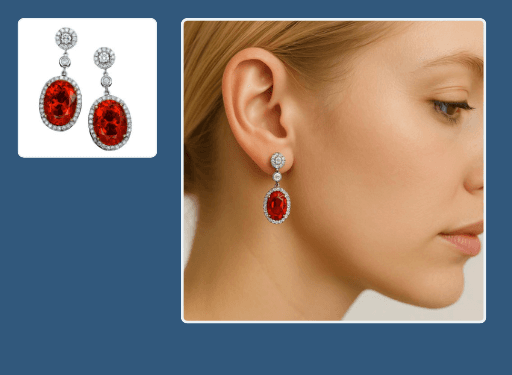
This earring try-on tool shows studs, hoops, and drop earrings on a lifelike ear and face, so shoppers see scale and movement instantly. Upload the pair and Hues renders a natural on-model image in about 30 seconds. Output ships in 4K with full commercial rights.
Why jewelers use it
True to the face
See how a drop hangs or a hoop frames the jaw, the context a packaging card never gives.
No studio session
Produce on-model earring imagery without a model, makeup, or lighting rig.
One look, whole range
Keep studs, huggies, and statement drops on consistent framing across the catalog.
Campaign-ready 4K
Every render is 4K with full commercial rights for product and social placements.
How it works
- 1
Upload the pair
Add a product photo of the studs, hoops, or drops.
- 2
Place them on-ear
Hues positions the earrings on a lifelike ear with natural light.
- 3
Download the image
Collect a 4K on-model frame in about 30 seconds.
What you can feed it
- Earring product shots
- Stud close-ups
- Hoop photos
- Drop-earring flat lays
- CAD files
Frequently asked questions
Yes. Hues renders earrings in a natural on-ear position, so shoppers can gauge how a drop hangs and how a hoop frames the face. That perspective is far more useful than a straight product shot on a card.
It does. Because the model is trained on jewelry, even small studs render with believable scale and sparkle on the ear rather than getting lost or exaggerated. Delicate pieces read clearly.
No. A product photo is enough, so you can create on-model earring imagery for new or made-to-order designs before a sample is in hand.
You start with 80 free credits once you verify your email address, and no card is required. The studio shows the exact credit cost of an on-ear render before you run it. Credits are a one-time purchase — there is nothing to subscribe to.
Related tools & reading
Virtual necklace try-on
Lifelike on-model necklace imagery in about 30 seconds.
Virtual ring try-on
Lifelike on-hand ring imagery rendered in about 30 seconds.
Jewelry set try-on
Coordinated set imagery rendered in about 30 seconds.
AI jewelry photography tools compared
Hues AI against Photoroom, Pebblely, Midjourney and a studio shoot.
Start with 80 free credits
No card required. Turn your next product shot into catalog-ready imagery in under a minute.