
Virtual Try-On
Virtual bracelet try-on: on the wrist in seconds
On-wrist bangles and chains rendered in about 30 seconds.
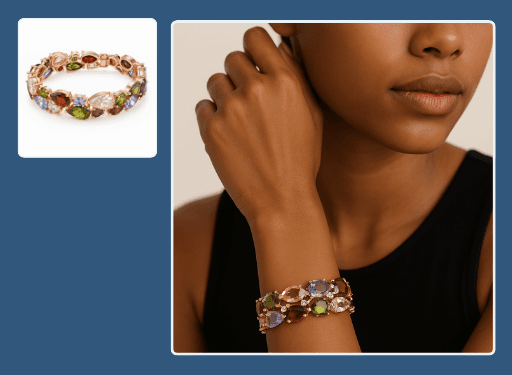
This bracelet try-on tool places bangles, tennis bracelets, and chains on a lifelike wrist so shoppers can judge fit and drape. Upload the piece and Hues renders a natural on-wrist image in about 30 seconds. Every file is 4K with full commercial rights.
Why jewelers use it
Fit made visible
See how a bangle sits or a tennis line drapes across the wrist, not just how it coils on a table.
No wrist model needed
Generate on-wrist imagery on demand without casting or a studio day.
Uniform across styles
Present cuffs, chains, and bangles on matching lighting and pose for a clean range.
Ready to publish
Renders come back in 4K with full commercial rights for store and campaign use.
How it works
- 1
Upload the bracelet
Add a product photo or CAD file of the piece.
- 2
Place it on-wrist
Hues fits the bracelet to a lifelike wrist with natural shadow.
- 3
Download the try-on
Grab a 4K on-wrist image in around 30 seconds.
What you can feed it
- Bracelet product shots
- Bangle photos
- Tennis-bracelet flat lays
- Cuff close-ups
- CAD files
Frequently asked questions
Yes. Hues renders the piece in believable proportion to the wrist, so a slim chain and a bold cuff each read at the right scale. Shoppers get a clearer sense of presence than a flat product photo provides.
It can. The tool renders how a flexible line settles and catches light across the wrist, which is exactly the detail that sells a tennis bracelet and is hard to capture on a table.
No. A product image or CAD file works, so you can produce on-wrist imagery for designs still in production or offered made to order.
New accounts get 80 free credits once you verify your email address, with no card required. Each on-wrist render shows its exact credit cost before you run it, and credits are a one-time purchase rather than a recurring plan.
Related tools & reading
Virtual ring try-on
Lifelike on-hand ring imagery rendered in about 30 seconds.
Virtual watch try-on
On-wrist watch imagery rendered in about 30 seconds.
Jewelry set try-on
Coordinated set imagery rendered in about 30 seconds.
AI jewelry photography tools compared
Hues AI against Photoroom, Pebblely, Midjourney and a studio shoot.
Start with 80 free credits
No card required. Turn your next product shot into catalog-ready imagery in under a minute.