
Retouching
AI jewelry photo retouching: rescue flawed shots in one pass
Dust, glare, and fingerprints gone in about 30 seconds.
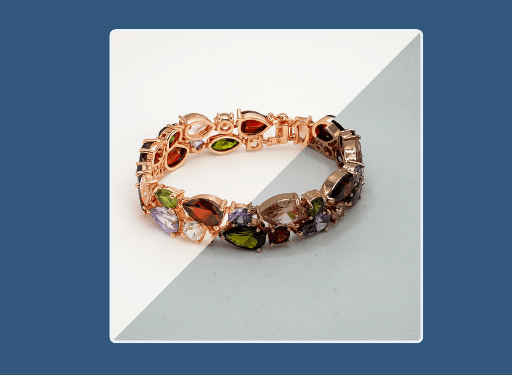
This jewelry photo retouching software removes dust, glare, fingerprints, and stray reflections from product shots automatically. Feed it a rushed or imperfect image and Hues returns a clean 4K frame in roughly 30 seconds, with metal and stones intact. It is the retouch pass without the retoucher's hours.
Why jewelers use it
Every flaw, one pass
Dust specks, scratches, and hotspots are cleaned together, so you skip the layer-by-layer cleanup in Photoshop.
Detail stays honest
Trained on 100+ jewelry datasets, the model preserves facet edges and metal texture instead of smearing them.
Minutes, not hours
A retouch that once took a specialist an afternoon now finishes in about 30 seconds per image.
Ready to publish
Results come back in 4K with full commercial rights, cleared for catalog and campaign use.
How it works
- 1
Upload the raw shot
Bring in the imperfect image, dust, glare, and all.
- 2
Let Hues clean it
The retoucher removes blemishes and balances reflections automatically.
- 3
Download the rescue
Collect a print-clean 4K frame in about half a minute.
What you can feed it
- Dusty macro shots
- Glare-heavy photos
- Fingerprinted metal
- Scratched surfaces
- Uneven lighting
Frequently asked questions
No. The model is trained specifically on jewelry, so it keeps facet definition, sparkle, and metal grain while removing dust and glare. The goal is a clean image that still looks like a real piece, not an airbrushed one.
Yes. Hues balances harsh hotspots and distracting reflections on polished surfaces while keeping the natural shine. Deeply reflective watches and bands are exactly the case the retoucher was built to rescue.
New accounts start with 80 free credits once you verify your email address, and no card is required. The studio shows each tool's exact credit cost before you run it, so you can rescue a few images and see exactly what they cost. Credits are a one-time purchase, not a subscription.
Every retouched image is delivered at 4K with full commercial rights. It is ready to drop straight into your store, marketplace listing, or printed catalog without a further export step.
Related tools & reading
AI jewelry photography
Catalog-ready 4K photography rendered in about 30 seconds.
Jewelry background removal
Clean or styled backgrounds rendered in about 30 seconds.
Jewelry model photography
Lifelike model photography rendered in about 30 seconds.
Product Retouching
Product retouching is the post-production editing of a product photograph to remove imperfections, correct color and exposure, and present the item cleanly and accurately for sale.
Catalog Image
A catalog image is a clean, consistent, and accurate product photograph used to represent an item for sale across a store, listing, or printed catalogue, typically shot to a standard framing and background.
How to Photograph Jewelry at Home Like a Pro
A hands-on guide to photographing jewelry: the gear that matters, how to control light and reflections, the camera settings for crisp detail, and where to stop fussing and let software help.
AI jewelry photography tools compared
Hues AI against Photoroom, Pebblely, Midjourney and a studio shoot.
Start with 80 free credits
No card required. Turn your next product shot into catalog-ready imagery in under a minute.