
Design & CAD
AI jewelry design visualizer: preview a design before you cast it
Photoreal renders from CAD or sketch in about 30 seconds.
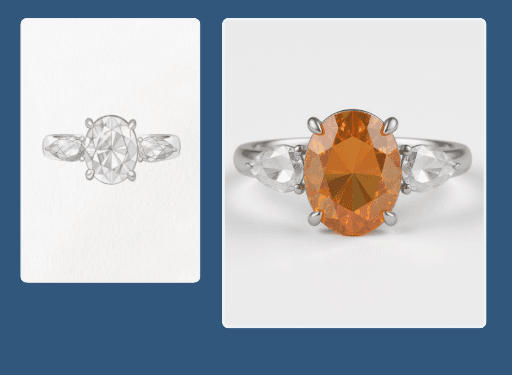
This CAD to render tool turns jewelry CAD files and hand sketches into photoreal 4K images before a piece is ever cast. Upload a file or drawing and Hues renders a lifelike preview in about 30 seconds, so you can approve designs, gather client feedback, and pre-sell. Every render carries full commercial rights.
Why jewelers use it
See it before it exists
Photoreal previews let you and your clients judge a design long before wax or casting.
Sketch or CAD, both work
Feed in a technical CAD file or a hand drawing and get a believable render either way.
Pre-sell with confidence
Show made-to-order and bespoke concepts as finished imagery to close commissions earlier.
4K, ready to share
Renders arrive in 4K with full commercial rights for proposals and product pages.
How it works
- 1
Upload the design
Add a CAD file or a scanned hand sketch of the piece.
- 2
Choose materials
Set the metal and stones you want the render to show.
- 3
Render the preview
Hues produces a photoreal 4K image in about 30 seconds.
What you can feed it
- CAD files
- Hand sketches
- Technical drawings
- Wireframe renders
- Reference images
Frequently asked questions
Yes. CAD to render is the core of this tool. You upload the file and Hues produces a photoreal image in about 30 seconds, so you can evaluate a design without waiting on a manual rendering pass.
It does. A scanned drawing is enough to generate a believable preview, which is useful early in the design process or when presenting a bespoke concept to a client before any CAD exists.
Yes. Because output ships at 4K with full commercial rights, you can put made-to-order and bespoke concepts in front of clients as finished imagery and take orders before casting a single piece.
New accounts get 80 free credits once you verify your email address, with no card required. Each design render shows its exact credit cost before you run it, and credits are a one-time purchase — there is no subscription.
Related tools & reading
AI jewelry photography
Catalog-ready 4K photography rendered in about 30 seconds.
Jewelry product video
A rotating 4K product clip in one to two minutes.
Jewelry background removal
Clean or styled backgrounds rendered in about 30 seconds.
CAD Rendering
CAD rendering is the process of converting a three-dimensional computer-aided design file into a photorealistic still image or animation, letting a product be seen and evaluated before it is ever manufactured.
Generative AI Imaging
Generative AI imaging is the use of trained artificial-intelligence models to create or transform photorealistic images from inputs such as text prompts, existing photos, sketches, or 3D files.
How to Turn a CAD File into a Photorealistic Render
A practical path from a jewelry CAD model to a photorealistic image: assigning materials, setting gemstones, lighting for sparkle, and where AI compresses the whole process.
AI jewelry photography tools compared
Hues AI against Photoroom, Pebblely, Midjourney and a studio shoot.
Start with 80 free credits
No card required. Turn your next product shot into catalog-ready imagery in under a minute.